![Icon-Wordmark-50px-Sorbet-3.png]](https://help.gethovr.com/hs-fs/hubfs/Icon-Wordmark-50px-Sorbet-3.png?height=40&name=Icon-Wordmark-50px-Sorbet-3.png)
- Next to your Hovr Moment, click on the gray “Customize” icon
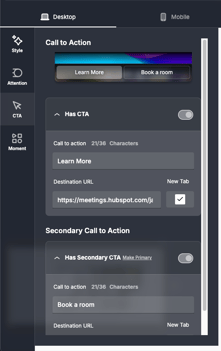
- Click the “CTA” tab on the left side of the side panel
- You will see options to make changes to Primary and Secondary texts/URLS
Your changes will be reflected immediately to the next person who visits your page!