![Icon-Wordmark-50px-Sorbet-3.png]](https://help.gethovr.com/hs-fs/hubfs/Icon-Wordmark-50px-Sorbet-3.png?height=40&name=Icon-Wordmark-50px-Sorbet-3.png)
You can apply your video preferences to a Fill either during the initial creation process or by editing an existing Fill later.
- During the initial setup: After selecting your Launch Button Style, you'll have the option to choose your preferred Video Display Settings:
- Black video bars
- Crop video to fit the image frame
- Ambient side bars
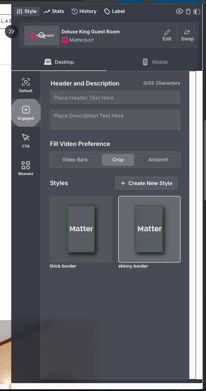
- For an existing Fill: In the On-site Editor, click Customize on your Fill. Under the Engaged section, you'll find the same Video Display Settings options where you can update your preference:
- Black video bars
- Crop video to fit the image frame
- Ambient side bars