![Icon-Wordmark-50px-Sorbet-3.png]](https://help.gethovr.com/hs-fs/hubfs/Icon-Wordmark-50px-Sorbet-3.png?height=40&name=Icon-Wordmark-50px-Sorbet-3.png)
There are two places you can filter by moment label. You can filter by moment label in the analytics dashboard and in the moments library.
In the Analytics Dashboard:
-
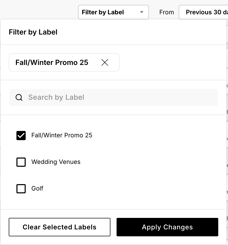
While in the analytics dashboard view, navigate to the box at the top of dashboard that says “Filter by Label”
-
“Click” the arrow
-
A dropdown will appear listing all the moment labels that have been created
-
Click the “moment label(s)” you want to filter by
-
Click “Apply Changes”
-
The analytics dashboard will automatically update to display only the data that have that specific label associate with it
-
You can filter by multiple moment labels by clicking more than one label name
-
You can also use the search bar in the dropdown to easily bring up a moment label if you have a long library of labelsWhen you want to filter by a different label click “clear selected labels” to reset the label filter

In the Moments Library:
-
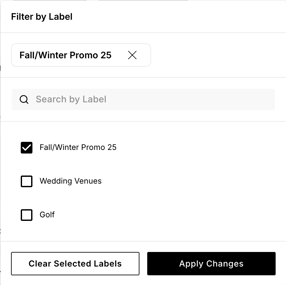
While in the moments library view, navigate to the box at the top of moments library that says “Filter by Label”
-
“Click” the arrow
-
A dropdown will appear listing all the moment labels that have been created
-
Click the “moment label(s)” you want to filter by
-
Click “Apply Changes”
-
The moments library will automatically update to display only the moments that have that specific label
-
You can filter by multiple moment labels by clicking more than one label name
-
You can also use the search bar in the dropdown to easily bring up a moment label if you have a long library of labels
-
When you want to filter by a different label click “clear selected labels” to reset the label filter

Congratulations! You just learned how to filter by moment labels!