![Icon-Wordmark-50px-Sorbet-3.png]](https://help.gethovr.com/hs-fs/hubfs/Icon-Wordmark-50px-Sorbet-3.png?height=40&name=Icon-Wordmark-50px-Sorbet-3.png)
You can add custom text to a Fill launch button either during the initial creation process or by editing an existing Fill later.
You can easily add copy to the Fill Launch Button while in the initial drop flow or going back and editing your Fill at a later time.
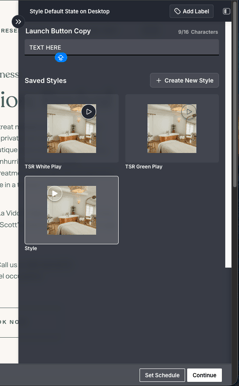
- During the initial setup: After selecting your content, you'll see a text field above your Saved Styles. Enter your desired button copy (up to 16 characters).
- For an existing Fill: In the On-site Editor, click Customize on your Fill. Under the Default section, you'll find the same text field above Saved Styles, where you can add or update your button copy (up to 16 characters).