![Icon-Wordmark-50px-Sorbet-3.png]](https://help.gethovr.com/hs-fs/hubfs/Icon-Wordmark-50px-Sorbet-3.png?height=40&name=Icon-Wordmark-50px-Sorbet-3.png)
-
From within the “On-Site Editor”
-
You will see the “Admin Bar” at the bottom
-
Click on “Add Moment”
-
Choose the moment type you want to add
-
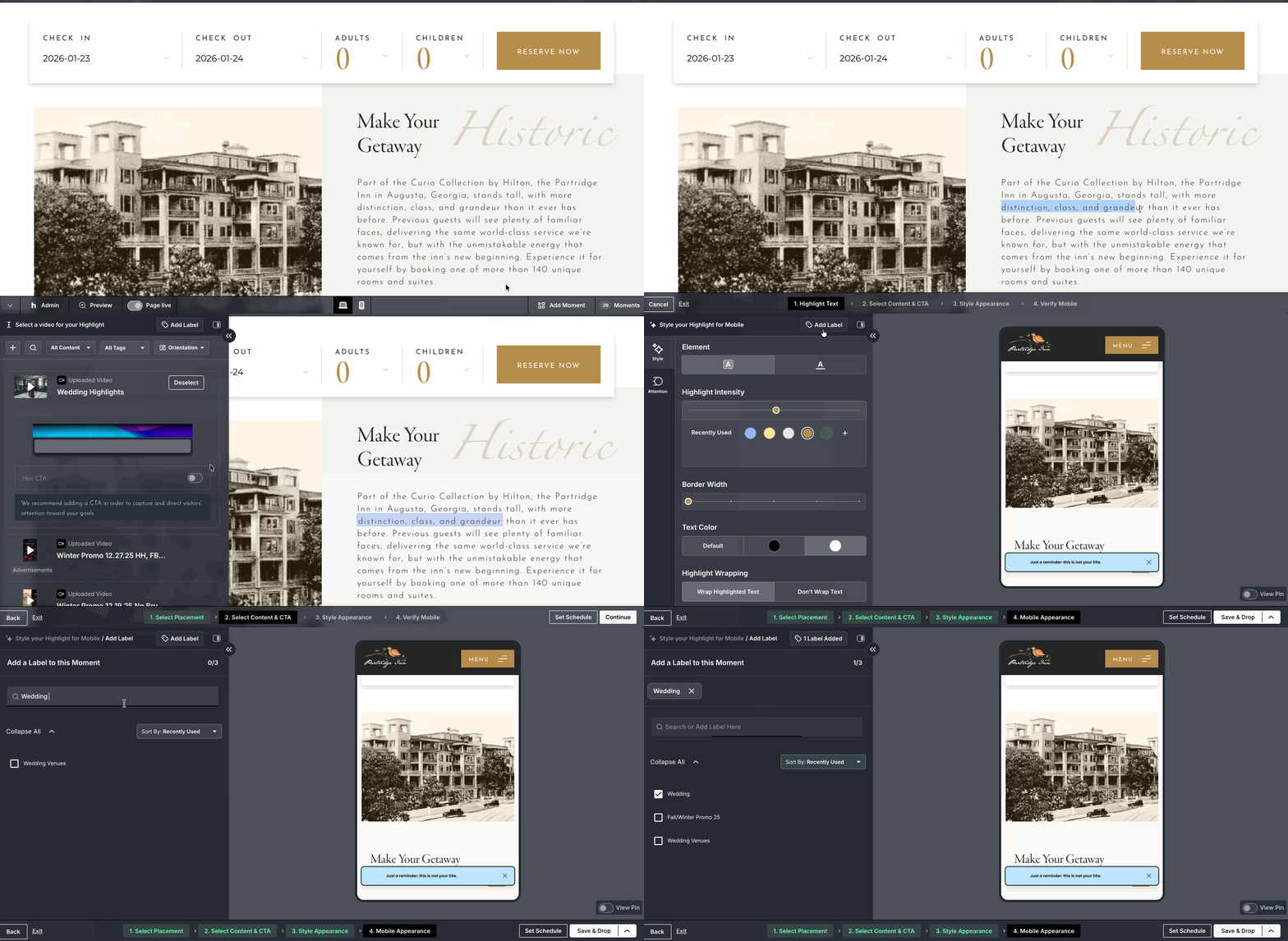
You will see “Add Label” at the top of each panel throughout the dropflow
- It will be at the top of the “Select a Video” panel and at the top of the “Styling” panels for both desktop and mobile
-
Click the “Label” tab at the top of the panel
-
Under the “Add a Label to this Moment” section, enter in the name of the label you want to add and hit enter
-
The label will now be created and automatically be checked
-
Hit “Enter” on your keyboard to “Save”
-
You also have the option to select existing labels from the list before saving changes
-
You can add a maximum of three labels per piece of content
-
You can also add a label to a moment from within the moments library
Tada! You added a new label to a moment during the dropflow!